Showing posts with label Apple-Iphone. Show all posts

Monday, 19 March 2012

[ DEB ] Cydia 1.1.5 & UltraSnow Fixer for 5.1

Cydia 1.1.5 & UltraSnow Fixer for 5.1

=
Cydia 1.1.5
=
UltraSnow Fixer for iOS 5.1


br

[ R ] [ N ] [ C ] [ _ ] [ E ] [ B ] [ M ]

[ iPhone4s-5.0.1 / iPad1_3G-5.0.1 / iPhone3G-4.2.1 ]

pass: 1275836697d9d39d5b1e3dc16f1b2cf28829f1197d

Thursday, 15 March 2012

Sn0wBreeze Gets Updated to 2.9.3 Bringing Additional Fixes

Sn0wBreeze Gets Updated to 2.9.3 Bringing Additional Fixes

iH8snow has updated to version 2.9.3, bringing Apple TV support for 4.4.3 and 4.4.4. A bug fix on iOS 5.0.1 was also fixed in which users would not be able to boot properly in rare occasions.

What is New?
-Added Apple TV 2 support for iOS 4.4.3/4.4.4.
-Fixed rare issues with iOS 5.0.1 where it would halt on the Apple upon boot.

Just adding this in mainly for users who dumped their SHSH blobs. On the initial boot, the Apple TV may have a black screen for 60 seconds after setting up the Apple TV. This is normal.


here more .
sn0wbreeze v2.9.3

What is New?

Added Apple TV 2 support for iOS 4.4.3/4.4.4.
Fixed rare issues with iOS 5.0.1 where it would halt on the Apple upon boot.

Just adding this in mainly for users who dumped their SHSH blobs. On the initial boot, the Apple TV may have a black screen for 60 seconds after setting up the Apple TV. This is normal.

Report any issues to iH8sn0w via Email (iH8sn0w@iH8sn0w.com) or Twitter (@iH8sn0w)


You can download Sn0wbreeze form the link below...

Download sn0wbreeze v2.9.3

Thursday, 8 March 2012

How To Jailbreak Your iPhone 3GS/4, iPod Touch 3G/4G and iPad 1 On iOS 5.1 With Redsn

How To Jailbreak Your iPhone 3GS/4, iPod Touch 3G/4G and iPad 1 On iOS 5.1 With Redsnow


Yesterday, Apple has released iOS 5.1 along side the New iPad. Since the release of iOS 5.1 the iPhone Dev Team members have been working as fast as they can to Jailbreak iOS 5.1 for the people who accidently updated to 5.1. MuscleNerd of the iPhone Dev Team announced the release of Redsn0w 0.9.10b6 to Tethered Jailbreak all the A4 Device, [iPhone 3GS/4, iPod Touch 3G/4G and iPad 1].


Redsn0w 0.9.10b6


This is a *tethered* 5.1 jailbreak for non-A5 devices. You’ll need to use redsn0w to “Just Boot” your device every time it power cycles, otherwise jailbreak apps won’t work (neither will Safari).
If you use ultrasn0w for your carrier unlock, be sure to use a custom IPSW to get to 5.1 first! Don’t ever restore to a stock Apple IPSW! Use redsn0w’s “Custom IPSW” button to create a NO_BB_* version of the 5.1 IPSW and restore to that instead of the stock one. (That option is available only to 3GS and iPhone4-GSM owners.) ultrasn0w itself will be updated for 5.1 in the next few days (same baseband support, not 5.1’s baseband).
If you’re lucky enough to have an old-bootrom 3GS, this jailbreak is actually untethered (redsn0w will figure that part out automatically).
While we were at it, we added @pod2g’s steaks4uce exploit to support MC models of the iPod touch 2G (whose last firmware was 4.2.1). So now redsn0w will auto-detect and jailbreak all versions of that older device.
iBooks won’t work until a future update of redsn0w


Jailbreak iPhone 3GS/4, iPod Touch 3G/4G and iPad 1 On iOS 5.1

Required Downloads:


iOS 5.1 for your device [Download]
Redsn0w 0.9.10b6 [Download For Windows / Mac OS X]
iTunes 10.6 [Download]


Jailbreak iPhone 3GS/4, iPod Touch 3G/4G and iPad 1 On iOS 5.1 Using Redsn0w 0.9.10b6

Step **1: Connect your iOS Device to your computer via USB, Launch iTunes 10.6 and Restore to iOS 5.1.

Step **2: Open Redsn0w 0.9.10b6 and click on “Jailbreak”


Step **3: Select “Install Cydia” and hit on “Next”


Step **4: Make Sure that your iOS Device is Turned OFF and Connected the computer before hitting “Next”.


Step **5: Follow the on screen instructions to put your iOS Device in DFU Mode.

Now, Just wait until the jailbreaking process is complete.

Remember: This is a Tethered jailbreak meaning that you need to connect your iOS Device to your computer, Open Redsn0w and Hitting “Just Boot” Every time the device is turned of or losses power.

iOS 5.1 and iTunes 10.6 now available for download

iOS 5.1 and iTunes 10.6 now available for download


Apple just released the new version of iOS, iOS 5.1, through Software Update. Notable new features in this update include Siri support for Japanese users, a new camera shortcut, and new Camera app for iPad. Full changelog below.

This update contains improvements and bug fixes, including:

Japanese language support for Siri (availability may be limited during initial rollout)
Photos can now be deleted from Photo Stream
Camera shortcut now always visible on Lock Screen for iPhone 4S, iPhone 4, iPhone 3GS and iPod touch (4th generation)
Camera face detection now highlights all detected faces
Redesigned Camera app for iPad
Genius Mixes and Genius playlists for iTunes Match subscribers
Audio for TV shows and movies on iPad optimized to sound louder and clearer
Podcast controls for playback speed and a 30 second rewind for iPad
Updated AT*T network indicator
Addres ses bugs affecting battery life
Fixes an issue that occasionally caused audio to drop for outgoing calls
*


Following today’s new iPad announcement, Apple has released a new version of iTunes, which reaches 10.6. iTunes 10.6 brings the possibility to play 1080p HD movies and TV shows from the iTunes Store, and “many improvements” for iTunes Match, listed below.

Improved song matching
Improved album artwork handling, downloading, and display
Ad******* an issue where songs may skip when playing from iCloud

Please refrain from updating.

A5 USER WARNING:

Even if you cache your SHSH blobs for your A5 devices with TinyUmbrella, they will not be usable at this time. A loophole or DFU/iBoot level exploit is needed to overcome the iBEC apticket requirement upon restore.

If you would like to restore to 5.0.1 (9A405/9A406) anytime soon on A5 devices, I strongly suggest you do it now while Apple is still signing the aptickets.

Download Links :

Sunday, 19 February 2012

AppleStation iPhone Tool

AppleStation Share this tool

Include Inside:
f0recast-v1.3.exe
greenpois0n.exe
iDetector-v1.0.1.exe
iFaith-v1.4.2.exe
iFirmware Downloader 1.0.exe
iFunBox.exe
iPhone Checker.exe
iREB-r5.exe
iSpirit.exe
iTools.exe
sn0wbreeze-2.1.exe
sn0wbreeze-v2.9.1.exe
tinyumbrella-5.10.06.exe
ToolJail_2.2.exe
redsn0w_win_0.9.4
redsn0w_win_0.9.6b5
redsn0w_win_0.9.6rc9
redsn0w_win_0.9.10b5c


DOWNLOAD HERE

iFunBox V1.8.798.616 Released


What’s New
1. Access App sandbox without Jailbreaking.
2. New device connection code, much lesser connection problems.
3. Self-diagnose and problem reporting.
4. Supports iPhone 4S and iOS 5.

Friday, 17 February 2012

iPhone For Dummies 5.0.1

iPhone For Dummies 5.0.1
I Will Start Posting Tutorials For iPhone Flashing Unlocking And Problems You Might Get While Working on iPhone


First There's Some Rules When You Work on iPhone :

-You Have to Check Before You Work What Version on the iphone and What Baseband Version If iPhone not Activated and You cant Check What Version Try This Simple Application
f0recast-v1.3

-If You Have iPhone 3GS or 3G With 6.15 Baseband It's Recommended to Restore With Custom Firmware Or iPhone 4G With Baseband 1.59 YOU MUST INSTALL CUSTOM FIRMWARE if You Want You iPhone Unlocked

This Tutorial For Restoring And Working on IOS 5.0.1

Restore:

iPhone 4S

Just Simple Restore With Original Firmware No Matter What Baseband Because There's No Unlock Solution Till Now

You Might Get Error While Restoring Error 3194 Go To C:\WINDOWS\system32\drivers\etc and OPEN host file With notepad and remove Last line should look like this
74.208.105.171 gs.apple.com
and Restore Again


iPhone 4G


-Factory Unlocked
Restore With Original Firmware No Matter What Baseband
You Might Get Error While Restoring Error 3194 Go To C:\WINDOWS\system32\drivers\etc and OPEN host file With notepad and remove Last line should look like this 74.208.105.171 gs.apple.com
and Restore Again


-Locked or need Preserved Baseband For 1.59 or 4.10 working on Gevey sim


You Have To restore With Custom firmware YOu Can Make it With sn0wbreeze2.9.1

Use Redsn0w To Enter Pwned Mode and Then Restore Either You wont be able to restore

If You Get Error 3194 Solution Already posted

iPhone 3GS:

-Factory Unlocked
Restore With Original Firmware No Matter What Baseband Because There's No Unlock Solution Till Now
You Might Get Error While Restoring Error 3194 Go To C:\WINDOWS\system32\drivers\etc and OPEN host file With notepad and remove Last line should look like this 74.208.105.171 gs.apple.com
and Restore Again


-Locked or need Preserved Baseband For 6.15 or Unlockable Baseband


You Have To restore With Custom firmware YOu Can Make it With sn0wbreeze2.9.1
For Some Users 3GS Remains untethered after custom Create Custom Firmware With Preserved baseband only Without jailbreak

Use Redsn0w To Enter Pwned Mode and Then Restore Either You wont be able to restore

If You Get Error 3194 Solution Already posted


iPAD and ipod is The Same Restore Simple Procedure nothing Special


Jailbreak:

Iphone 4S and iPAd 2:
Use absinthe-win-0.4

It's Very simple And Easy

iPhone 4G and 3Gs :

Use redsn0w_win_0.9.10b5


If You Get DONT SEND ERROR When Redsn0w uploading First stage Remove Cable for 3 sec and Reconnect Thanks To Shedid


Unlock:

For 3GS with baseband 6.15 After Restore You have to install baseband again with redsn0w 10b5 and install ultrasn0w


Tuesday, 14 February 2012

A5 Jailbreak released Only Mac & Windows


Windows » GreenPois0n Absinthe v0.2 for Windows


(Copy Paste Password)PassWord » Sitlay KING


New unlock iPhone 3G / 3GS with baseband 6.15 without Wifi


New unlock iPhone 3G / 3GS with baseband 6.15 without Wifi


Thursday, 9 February 2012

...:::How To Read iPhone Passcode With Gecko iPhone Toolkit (Video):::...

...:::How To Read iPhone Passcode With Gecko iPhone Toolkit (Video):::...


Hi all Gsmhosting Friends.......

This Program Working Good For Read Passcode in iPhone

Tested in Two iPhone 4 iOS 5.0.1
See This Video.......


MediaFire
Download
 

Save Your iPhone 4S 5.0.1 SHSH Blobs

:::Important:::..Save Your iPhone 4S 5.0.1 SHSH Blobs..:::Important:::


How to save iPhone 4S SHSH Blobs on iOS 5.0.1 With TinyUmbrella?
If you want to save SHSH blobs for iPhone 4S
so that you can get the untethered jailbreak for iPhone 4S
then the TinyUmbrella update is the answer for you.
The famous developer Notcom updated the tool TinyUmbrella,
to add support for saving SHSH blobs on the second build of iOS 5.0.1
for the iPhone 4S (9A406).


What Are SHSH Blobs?
First of all for all the people who don’t know what the SHSH blobs are.
SHSH blobs is a Hash signature system (Signature HaSH blobs) made by Apple inc.
to control manual software downgrades on
iPhones, iPads and iPod touches
which is basically a prelude to jailbreaking.


So download the tool and save the SHSH blobs
just in case Apple releases a new iOS 5 update
and accidentally you clicked the update button.
In that case you the saved SHSH blobs for your
iPhone 4S will help you to downgrade to iOS 5.0.1
and get the untethered jailbreak for your iDevice.

Download TinyUmbrella from below links
then open it and connect your iPhone 4S
with your PC / Mac and click on “Save SHSH” button.


TinyUmbrella for Windows :: Download

TinyUmbrella for Mac OS X:: Download

Tuesday, 7 February 2012

iPhoneYeta 1G beta

iPhoneYeta is a new version on Jailbroken Quick Tool..

New look,
compatible on itunes 5,

Features:
Auto update,
No wifi method - added ultrasn0w 1.2.4.
manual deb
manual ipa.
backup/restore contacts,notes,sms,
Chicken baseband
skull remover cause of greenpoison
Android lock remover
Host file tool - you can set hosts to cydia,apple or delete hosts file
Jailbreak information - all information for jailbreaking are here.
Recovery tool - can kick and enter in recory mode


Download here:
Multiupload.com - upload your files to multiple file hosting sites!

Please report some bugs here:
Not yet tested on windows 7

iPhone For Dummies 5.0.1

I Will Start Posting Tutorials For iPhone Flashing Unlocking And Problems You Might Get While Working on iPhone


First There's Some Rules When You Work on iPhone :

-You Have to Check Before You Work What Version on the iphone and What Baseband Version If iPhone not Activated and You cant Check What Version Try This Simple Application
f0recast-v1.3

-If You Have iPhone 3GS or 3G With 6.15 Baseband It's Recommended to Restore With Custom Firmware Or iPhone 4G With Baseband 1.59 YOU MUST INSTALL CUSTOM FIRMWARE if You Want You iPhone Unlocked

This Tutorial For Restoring And Working on IOS 5.0.1

Restore:

iPhone 4S

Just Simple Restore With Original Firmware No Matter What Baseband Because There's No Unlock Solution Till Now

You Might Get Error While Restoring Error 3194 Go To C:\WINDOWS\system32\drivers\etc and OPEN host file With notepad and remove Last line should look like this
74.208.105.171 gs.apple.com
and Restore Again

iPhone 4G


-Factory Unlocked
Restore With Original Firmware No Matter What Baseband
You Might Get Error While Restoring Error 3194 Go To C:\WINDOWS\system32\drivers\etc and OPEN host file With notepad and remove Last line should look like this 74.208.105.171 gs.apple.com
and Restore Again


-Locked or need Preserved Baseband For 1.59 or 4.10 working on Gevey sim


You Have To restore With Custom firmware YOu Can Make it With sn0wbreeze2.9.1

Use Redsn0w To Enter Pwned Mode and Then Restore Either You wont be able to restore

If You Get Error 3194 Solution Already posted

iPhone 3GS:

-Factory Unlocked
Restore With Original Firmware No Matter What Baseband Because There's No Unlock Solution Till Now
You Might Get Error While Restoring Error 3194 Go To C:\WINDOWS\system32\drivers\etc and OPEN host file With notepad and remove Last line should look like this 74.208.105.171 gs.apple.com
and Restore Again


-Locked or need Preserved Baseband For 6.15 or Unlockable Baseband


You Have To restore With Custom firmware YOu Can Make it With sn0wbreeze2.9.1
For Some Users 3GS Remains untethered after custom Create Custom Firmware With Preserved baseband only Without jailbreak

Use Redsn0w To Enter Pwned Mode and Then Restore Either You wont be able to restore

If You Get Error 3194 Solution Already posted


iPAD and ipod is The Same Restore Simple Procedure nothing Special


Jailbreak:

Iphone 4S and iPAd 2:
Use absinthe-win-0.4

It's Very simple And Easy

iPhone 4G and 3Gs :

Use redsn0w_win_0.9.10b5


Unlock:

For 3GS with baseband 6.15 After Restore You have to install baseband again with redsn0w 10b5 and install ultrasn0w


Thursday, 26 January 2012

iPhone 3g Buzzer Jumper Trick Solution


Iphone 3g buzzer suara tidak bunyi....alias bisu, langkahnya:
  1. Ganti buzzer
  2. Cek pengaturan dan lain2nya
  3. Ikuti langkjah trik dibawah ini:


Tuesday, 24 January 2012

Create an iTunes Account without a credit card


iTunes Store offers a large variety of free content, but to download it you have to have an account. Usually you have to enter your credit card information to sign up, but here’s an easy way to get an iTunes account for free downloads without entering any payment info.

Although iTunes Store is known for paid downloads of movies, music, and more, it also has a treasure trove of free media. Some of it, including Podcasts and iTunes U educational content do not require an account to download. However, any other free content, including free iPhone/iPod Touch apps and free or promotional music, videos, and TV Shows all require an account to download. If you try to download a free movie or music download, you will be required to enter payment information.

Even though your card will not be charged, it will be kept on file so you can be charged if you download a for-pay item. However, if you only plan to download free items, it may be preferable to not have your account linked to a credit card. The following steps will get you an account without entering your credit card info.


Getting Started

First, make sure you have iTunes installed. If you don’t already have it,Download and install it with the default settings.

After Installation:Now open iTunes, and click the iTunes Store link on the left.


Click the App Store link on the top of this page.


Select a free app to download. A simple way to do this is to scroll down to the Top Free Apps box on the right side, hover your mouse over the first item, and click on the Free button that appears when you hover over it.


A popup will open asking you to sign in with your Apple ID. Click “Create New Account”.


Click Continue to create your account.(In Open Window)

Check the box to accept the Store Terms and Conditions, and click Continue.


Enter your email address, password, security question, and date of birth, and uncheck the boxes to get email if you don’t want it…then click Continue.


1: Now, you will be asked to provide a payment method. Notice now that the last option says None! Click that bullet option…
2: Then enter your billing address. Simply enter your normal billing address, even though you are not entering a payment method. Click Continue and your account will be created!


If you get the Address Verification screen just verify your county and click Done.


An email will be sent to you to verify your account…


Open Your Mail Account,Open Email sent by Apple,Click on the link in your email to verify your account, iTunes will launch and you’re prompted to enter in the Apple ID and Password you just created.


Your account is successfully created!


If you have any Confusion So see Video Guide Below...

http://www.youtube.com/watch?v=9oq1LawoPm4

Monday, 23 January 2012

iPhone 4S and iPad 2 Jailbreak is Officially Released for Windows

The Chronic Dev-Team has released the Windows version of its Absinthe utility to perform an untethered jailbreak of the iPhone 4S and iPad 2.

You can download the utility from here.

Download Greenpoison Absinthe 1.2.1 To Jailbreak iOS5.0.1 On iP

Finally, P0sixninja the well known hacker and our great warrior behind Greenpoison has released Greenpoison Absinthe V0.1.2.1 to jailbreak both iPhone 4S [ running iOS 5.0 or either 4S version of 5.0.1* ] or your iPad 2 [ all Wi-Fi only, GSM & CDMA devices supported: must be running iOS 5.0.1* ]. Now you can download Greenpois0n to Jailbreak your iPhone 4S or iPad 2 on iOS 5.0 or iOS 5.0.1 on Mac. Greenpoison will be available for Windows and Linux over coming few hours. Download Greenpois0n for Mac from the links below after the jump.


That was the most awaiting news ever this month and it finally real and between your hands. Greenpoison Absinthe v.0.1.2.1 allow you to jailbreak your iDevices running on iOS 5 and iOS 5.0.1 untethered.


Download Greenpoison Absinthe V 0.1.2.1 from here :


Download Greenpoison Absinthe 1.2.2 For [ Mac ]
Download Greenpoison Absinthe v.0.1.2.1 For [ Windows ]
Download Greenpois0n Absinthe v.0.1.2.1 For [ Linux ] -----> Coming Soooon

Saturday, 21 January 2012

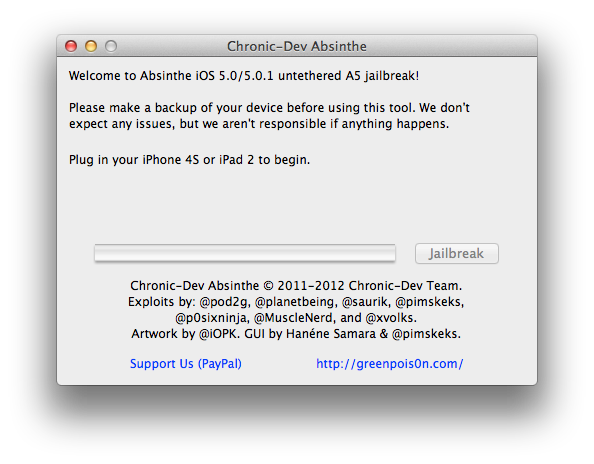
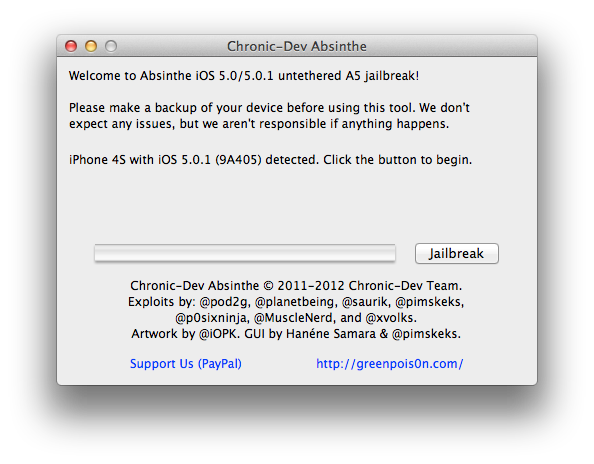
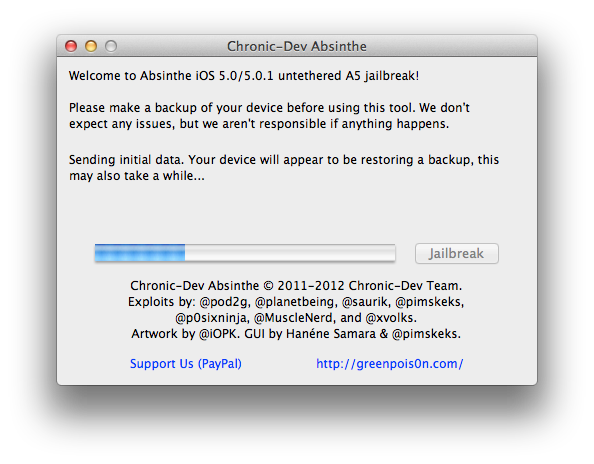
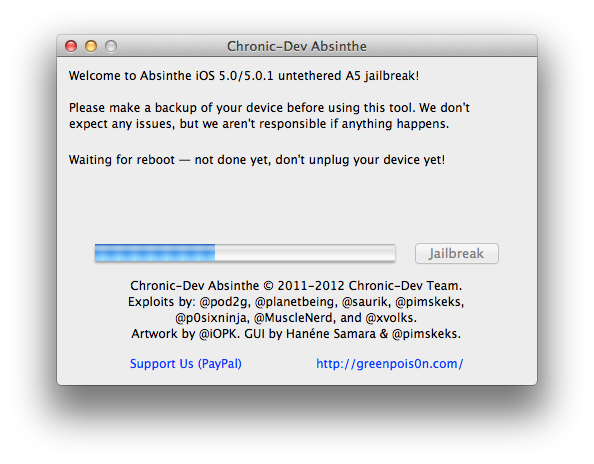
How to Jailbreak Your iPhone 4S Using Absinthe (Mac) [5.0, 5.0.1]

These are instructions on how to perform an untethered jailbreak of your iPhone 4S using Absinthe for Mac.


Warning***: Before you continue make sure to do a backup of your device in iTunes as you may lose your Camera Roll during this process.


Step One
Download the latest version of Absinthe from here.


Step Two
Double click to extract the downloaded archive and launch the Absinthe application.


Step Three
As prompted, connect your iPhone 4S to the computer via USB.


Step Four
Click the Jailbreak button to begin


Step Five
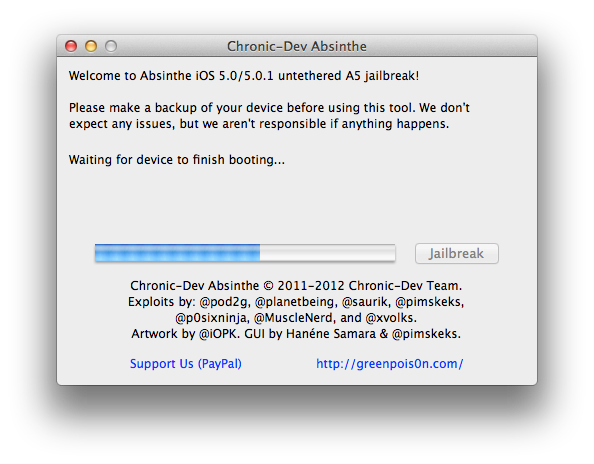
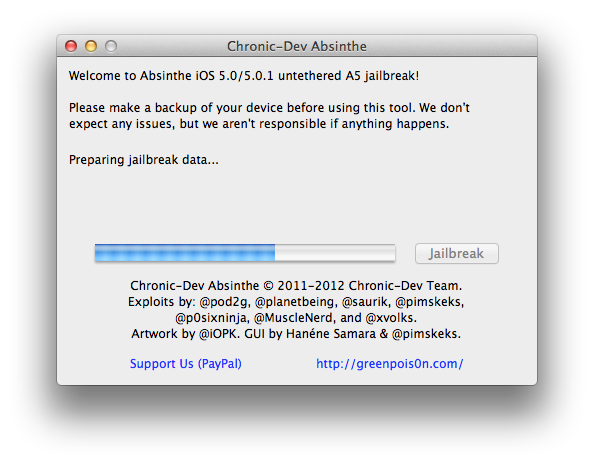
The application will take you through several steps of the jailbreak: Sending initial data, waiting for reboot, waiting for device to finish booting, Preparing jailbreak data, and Sending payload data.


Step Six
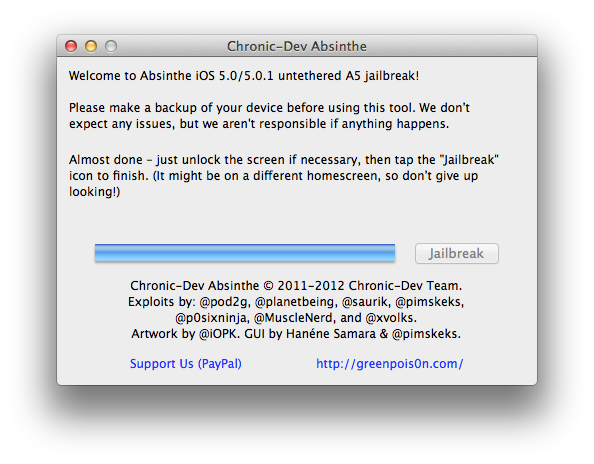
You will be informed that the jailbreak is 'Almost done'.


Step Seven
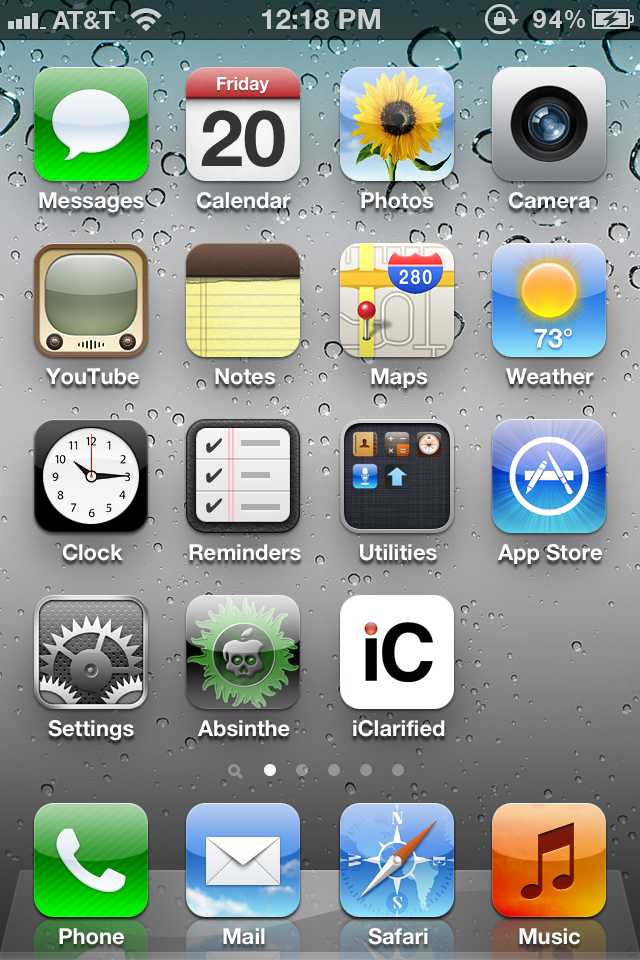
On your device, locate the Absinthe icon and press it to complete your jailbreak. It could be on any homescreen.


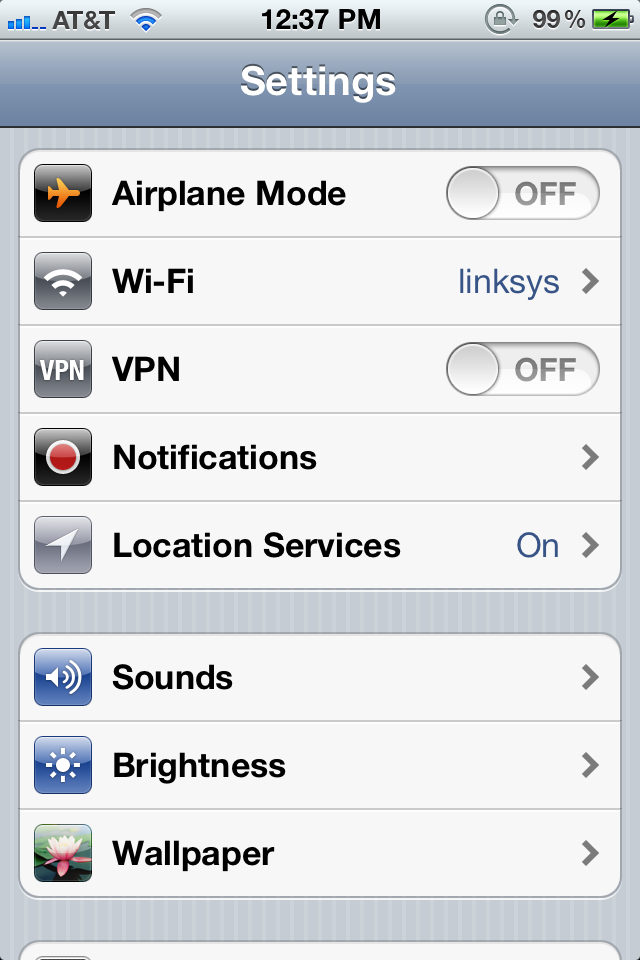
If the server is down and you get an Error establishing a database connection message then tap the Settings icon on your springboard and turn on VPN.


You will get a configuration error; however, after about a minute your device will reboot with Cydia on the Springboard!

Dream Team releases Untethered Jailbreak for iPhone 4S & iPad 2 !
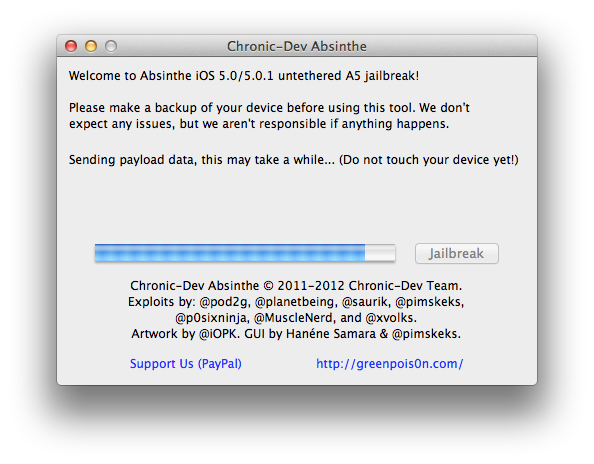
The 'Dream Team' of hackers have just released their untethered jailbreak for the iPhone 4S and the iPad 2.

The ridiculously complex combination of exploits-within-exploits that make this iOS jailbreak possible have consumed thousands of hours of brain-power & effort from a legion of world-renowned hackers, several of whom have been working diligently on this project since the dual-core A5 processor was unveiled by Apple last March. Ten months ago, I myself was live tweeting from a tediously long line at the nearest Apple retail store, where I anxiously waited to become one of the world's first owners (& hackers) of the newly-released iPad 2.

Untethered Jailbreak for iPhone 4S & iPad 2 !

This release should come as no surprise to those of you who have been following pod2g’s iOS blog for the past few months. Earlier this week, you might have even wet your pants a little when you watched the video demonstration of today’s release (named Absinthe A5) and first witnessed our jailbreak working its magic to liberate both the iPhone 4S & iPad 2.
What you may not fully realize yet is just how hard the exploits in this Apple A5 jailbreak are working behind the scenes – and, though I mentioned it last week on my Twitter – what a glorious hacker’s wet dream the Absinthe A5 toolkit has ultimately evolved into!

The initial release is currently for Mac OS X only but Windows is coming soon!

Download and Read More

Friday, 20 January 2012

Apple Releases iTunes 10.5.3 Support [iBooks Textbooks]

Apple Releases iTunes 10.5.3 Support [iBooks Textbooks]
(Safe to Update for jailbreakers and unlockers)


Following iBooks 2.0, iBooks Author and iTunes U for iOS, Apple just released a new version of iTunes, 10.5.3. We’re downloading the update to get our hands on a proper changelog but it’s likely that this new version will simply bring support for textbooks and, perhaps, manual syncing of books created through iBooks Author.

Update: iTunes 10.5.3 does indeed enable textbook syncing to iPads.

What's New:
iTunes 10.5.3 allows you to sync interactive iBooks textbooks to your iPad. These Multi-Touch textbooks are available for purchase from the iTunes Store on your Mac or from the iBookstore included with iBooks 2 on your iPad.


iBooks textbooks are created with iBooks Author — now available as a free download on the Mac App Store.


Direct Download Links:
iTunes 10.5.3 for Windows XP, Vista or Windows 7
iTunes 10.5.3 for Windows (64-bit)
Mac

Share

Twitter Delicious Facebook Digg Stumbleupon Favorites More